Review the following sections on how to send social media data to Global Relay Archive.
For all data captured using the Event Archiving API, you must initially determine the basic data hierarchy and naming with Sections and Cards, such as:
{
  "cards": [
    {
      "title": "New LinkedIn Post",
      "sections": [
        {
          "events": []
        }
      ]
    }
  ]
}
There are no mandatory fields in the Cards and Sections objects; however, you should specify a meaningful cards.title, and you can also control whether the Card is collapsed or displayed in full, etc. For more information, see Displaying collapsible Cards.
The cards.title displays in the archived message, so we recommend using a descriptive title for searching purposes.
The cards.title displays in the archived message, so we recommend using a descriptive title for searching purposes.
The API supports events and simpleEvents, but only events supports sending data content. For instructions on how to capture simpleEvents such as likes and reactions, see Responding and reacting to posts.
Capturing a new LinkedIn post
In this example, we use the API to capture a LinkedIn post created by a company’s HR department, with an html body and website link.
In the request payload:
- A unique threadId is generated using a LinkedIn identifier.
- The eventType value is Post to represent new content creation. For a complete list of eventTypes and their intended uses, see Supported Event Types.
- The body.textType is specified as “html” for effective rendering in the Archive.
{
  "overview": {
    "threadId": "linkedin-post:1234"
  },
  "cards": [
    {
      "title": "New LinkedIn Post",
      "sections": [
        {
          "events": [
            {
              "eventTime": "2024-01-01T08:30:00Z",
              "user": {
                "identifier": "hr@greenvaultcapital.com",
                "displayName": "GV Capital: HR"
              },
              "eventType": "Post",
              "body": {
                "text": "<h1>Join Our Growing Team at Green Vault Capital!</h1><p>Are you passionate about <b>sustainable investments</b> and making a <b>positive impact</b> on the environment? Green Vault Capital is expanding, and we're looking for talented individuals to join our dynamic team. If you're eager to contribute, we want to hear from you!</p><p><a href=\"https://www.greenvaultcapital.com/jobs\">Click here to apply now!</a></p>",
                "textType": "html"
              }
            }
          ]
        }
      ]
    }
  ]
}
You can apply the concepts from this example for capturing data from other similar social media platforms.
Only the eventTime, user.identifier, and eventType fields are mandatory when capturing a new Post.
Capturing content in plain text or HTML
We recommend you send content as HTML when possible, so that all the styling and markup from the original post displays in the Archive. To send HTML content, ensure you set the body.textType value to “html”.
Global Relay filters all HTML data ingested into the Archive to ensure improperly formatted or potentially malicious HTML tags and associated content are removed.
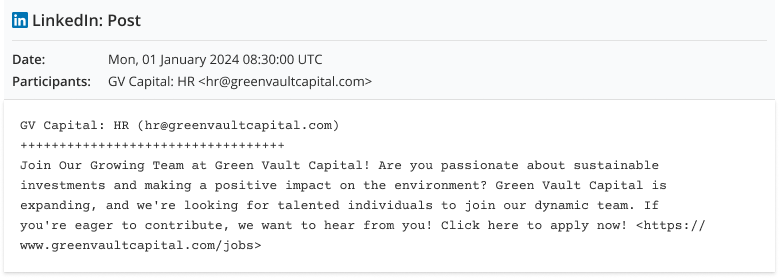
To capture simple plain text content, set body.textType to “plain”:
{
  "events": [
    {
      "eventTime": "2024-01-01T08:30:00Z",
      "user": {
        "identifier": "hr@greenvaultcapital.com",
        "displayName": "GV Capital: HR"
      },
      "eventType": "Post",
      "body": {
        "text": "Join Our Growing Team at Green Vault Capital! Are you passionate about sustainable investments and making a positive impact on the environment? Green Vault Capital is expanding, and we're looking for talented individuals to join our dynamic team. If you're eager to contribute, we want to hear from you! Click here to apply now! https://www.greenvaultcapital.com/jobs",
        "textType": "plain"
      }
    }
  ]
}
Sending custom Event properties
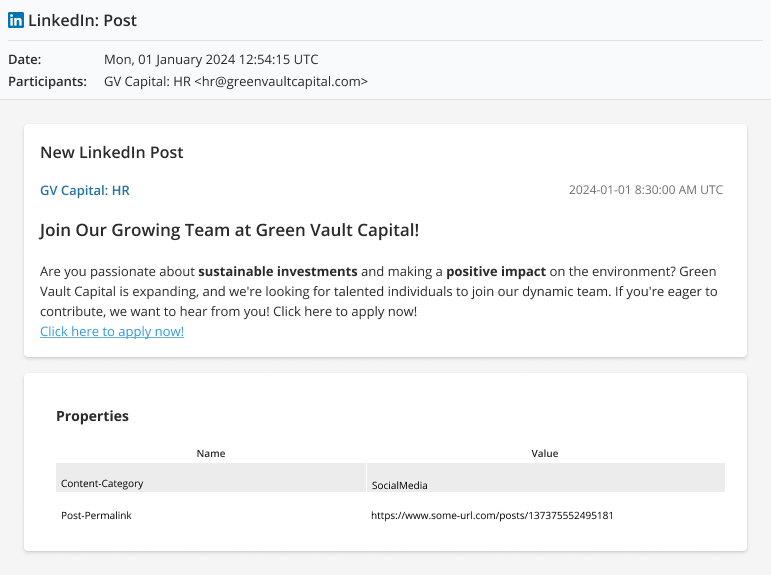
If you need to capture custom data or properties about the social media post, use the eventFields object as well as the body.content.
{
  "overview": {
    "threadId": "linkedin-post:1234"
  },
  "cards": [
    {
      "title": "New LinkedIn Post",
      "sections": [
        {
          "events": [
            {
              "eventTime": "2024-01-01T08:30:00Z",
              "user": {
                "identifier": "hr@greenvaultcapital.com",
                "displayName": "GV Capital: HR"
              },
              "eventType": "Post",
              "body": {
                "text": "<h1>Join Our Growing Team at Green Vault Capital!</h1><p>Are you passionate about <b>sustainable investments</b> and making a <b>positive impact</b> on the environment? Green Vault Capital is expanding, and we're looking for talented individuals to join our dynamic team. If you're eager to contribute, we want to hear from you!</p><p><a href=\"https://www.greenvaultcapital.com/jobs\">Click here to apply now!</a></p>",
                "textType": "html"
              },
              "eventFields": [
                {
                  "fieldTitle": "Content-Category",
                  "fieldValues": [
                    {
                      "content": {
                        "text": "SocialMedia"
                      }
                    }
                  ]
                },
                {
                  "fieldTitle": "Post-Permalink",
                  "fieldValues": [
                    {
                      "content": {
                        "text": "https://www.some-url.com/posts/137375552495181"
                      }
                    }
                  ]
                }
              ]
            }
          ]
        }
      ]
    }
  ]
}
The fieldTitle and fieldValues.content.text display on all archived messages associated with the API request. Therefore, you can search on these values as keywords in the message body to return related messages.
Capturing content edits for a LinkedIn post
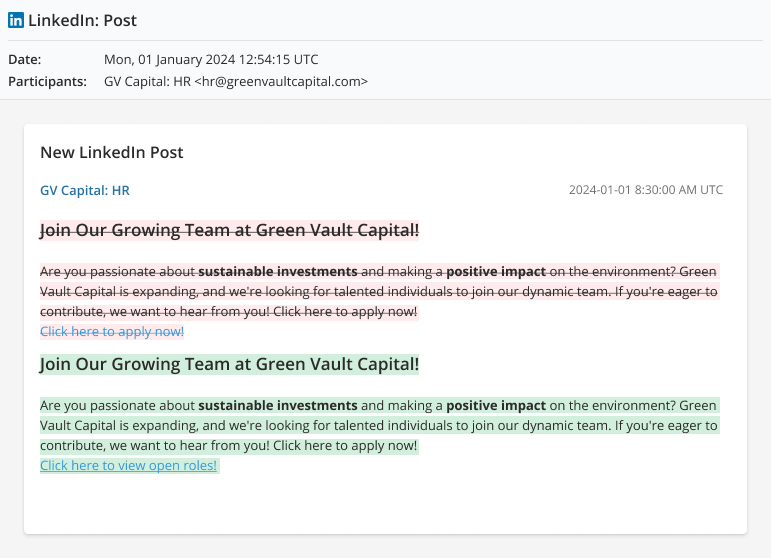
When a social media post is edited, we recommend sending both the original content and the new content in your API request, so that users can view the difference in the Archive.
To do this:
- Use the events.body and events.originalBody fields
- Send the eventType value Post Edited
In this example, a change was made to the website URL and linked text:
{
  "events": [
    {
      "eventTime": "2024-01-04T11:20:00Z",
      "user": {
        "identifier": "hr@greenvaultcapital.com",
        "displayName": "GV Capital: HR"
      },
      "eventType": "Post Edited",
      "originalBody": {
        "text": "<h1>Join Our Growing Team at Green Vault Capital!</h1><p>Are you passionate about <b>sustainable investments</b> and making a <b>positive impact</b> on the environment? Green Vault Capital is expanding, and we're looking for talented individuals to join our dynamic team. If you're eager to contribute, we want to hear from you!</p><p><a href=\"https://www.greenvaultcapital.com/jobs\">Click here to apply now!</a></p>",
        "textType": "html"
      },
      "body": {
        "text": "<h1>Join Our Growing Team at Green Vault Capital!</h1><p>Are you passionate about <b>sustainable investments</b> and making a <b>positive impact</b> on the environment? Green Vault Capital is expanding, and we're looking for talented individuals to join our dynamic team. If you're eager to contribute, we want to hear from you!</p><p><a href=\"https://www.greenvaultcapital.com/careers\">Click here to view open roles!</a></p>",
        "textType": "html"
      }
    }
  ]
}