Review the following tutorials on how to send specific project management or collaboration platform data, such as Jira project and issue data, using the Event Archiving API.
The following examples reference Jira; however, you can apply the same principles for other similar platforms.
Capturing Jira projects
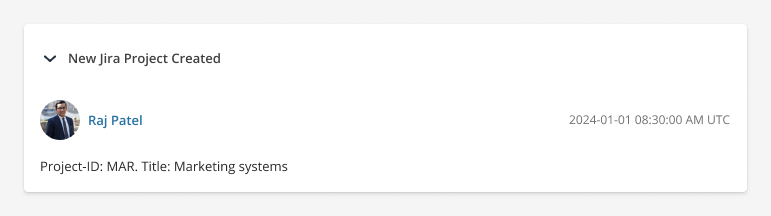
To capture the creation of a Jira project, we recommend sending only that project, with a unique threadId, in the API request. As a result, users can then locate any changes to the project with the same threadId using the Group by conversation functionality in the Archive.
You can use the identifier of the project as the threadId; however, any unique ID is valid.
{
  "overview": {
    "owner": {},
    "threadId": "jira-project:MAR"
  },
  "cards": [
    {
      "title": "New Jira Project Created",
      "sections": [
        {
          "events": [
            {
              "eventTime": "2024-01-01T08:30:00Z",
              "user": {
                "identifier": "raj.patel@greenvaultcapital.com",
                "displayName": "Raj Patel"
              },
              "eventType": "Post",
              "body": {
                "text": "Project-ID: MAR. Title: Marketing systems",
                "textType": "plain"
              }
            }
          ]
        }
      ]
    }
  ]
}
Capturing a new Jira issue
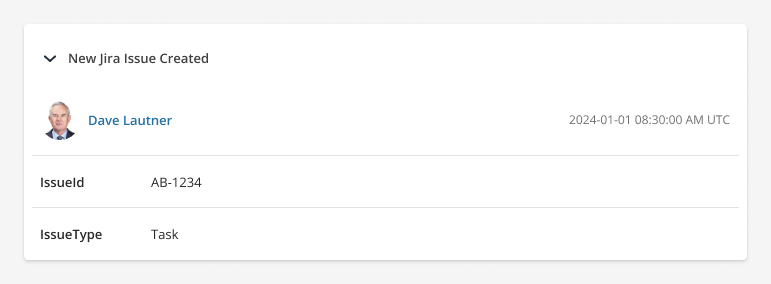
In each new Jira issue API request, we recommend sending only one Jira issue, assigned a unique threadId, which can be reused for subsequent payloads relating to that issue. Users can then find the full history of related Events in the Archive using the Group by conversation functionality.
In this API request payload:
- The cards.title describes the Event.
- Each Card contains a single Section and Event.
- Because new content was created, the eventType is Post.
- There is no body.content; instead, Event Properties are used to capture the key-value pairs of the Jira issue.
{
  "overview": {
    "threadId": "jira-issue:AB-1234"
  },
  "cards": [
    {
      "title": "New Jira Issue Created",
      "sections": [
        {
          "events": [
            {
              "eventTime": "2024-02-04T08:30:00Z",
              "user": {
                "identifier": "dave.lautner@greenvaultcapital.com",
                "displayName": "Dave Lautner"
              },
              "eventType": "Post",
              "eventFields": [
                {
                  "fieldTitle": "IssueId",
                  "fieldValues": [
                    {
                      "content": {
                        "text": "AB-1234",
                        "textType": "plain"
                      }
                    }
                  ]
                },
                {
                  "fieldTitle": "IssueType",
                  "fieldValues": [
                    {
                      "content": {
                        "text": "Task",
                        "textType": "plain"
                      }
                    }
                  ]
                }
              ]
            }
          ]
        }
      ]
    }
  ]
}
For readability, these snippets do not contain all mandatory properties. For the full schema definition, refer to the API Reference.
Updating the Jira issue
When you send subsequent API requests to capture updates to the Jira issue, include the same threadId.
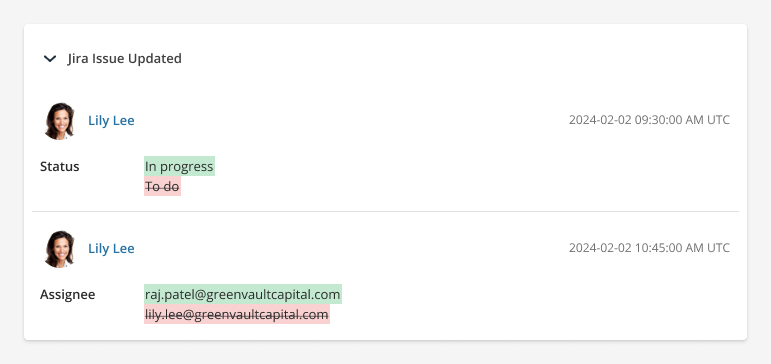
In this payload, 2 Events are captured in the same Card, separated into Sections.
- In the first Event, the issue status is changed from To do to In progress.
- In the second Event, the assignee is changed.
- The fieldValues.originalContent and fieldValues.content fields are used to produce a visual before-after in the Archive.
{
  "overview": {
    "threadId": "jira-issue:AB-1234"
  },
  "cards": [
    {
      "title": "Jira Issue Updated",
      "sections": [
        {
          "events": [
            {
              "eventTime": "2024-02-02T09:30:00Z",
              "user": {
                "identifier": "lily.lee@greenvaultcapital.com",
                "displayName": "Lily Lee"
              },
              "eventType": "Post Edited",
              "eventFields": [
                {
                  "fieldTitle": "Status",
                  "fieldValues": [
                    {
                      "content": {
                        "text": "In progress",
                        "textType": "plain"
                      },
                      "originalContent": {
                        "text": "To do",
                        "textType": "plain"
                      }
                    }
                  ]
                }
              ]
            }
          ]
        },
        {
          "events": [
            {
              "eventTime": "2024-02-02T10:45:00Z",
              "user": {
                "identifier": "lily.lee@greenvaultcapital.com",
                "displayName": "Lily Lee"
              },
              "eventType": "Post Edited",
              "eventFields": [
                {
                  "fieldTitle": "Assignee",
                  "fieldValues": [
                    {
                      "content": {
                        "text": "raj.patel@greenvaultcapital.com",
                        "textType": "plain"
                      },
                      "originalContent": {
                        "text": "lily.lee@greenvaultcapital.com",
                        "textType": "plain"
                      }
                    }
                  ]
                }
              ]
            }
          ]
        }
      ]
    }
  ]
}
Referencing user mentions
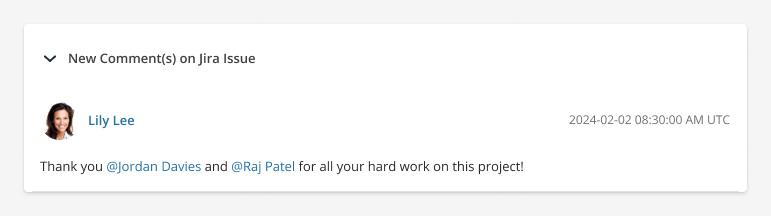
If you add text to an issue which tags specific Jira users in your organization, e.g. in the description or comments, use the events.participants object to identify them properly in the Archive.
In this example, Lily tags Jordan and Raj in a comment on this issue:
{
  "overview": {
    "threadId": "jira-issue:AB-1234"
  },
  "cards": [
    {
      "title": "New Comment(s) on Jira Issue",
      "sections": [
        {
          "events": [
            {
              "eventType": "Post",
              "eventTime": "2024-01-01T08:30:00Z",
              "user": {
                "identifier": "lily.lee@greenvaultcapital.com",
                "displayName": "Lily Lee"
              },
              "body": {
                "text": "<p>Thank you @jordan and @raj for all your hard work on this project!</p>",
                "textType": "html"
              },
              "participants": [
                {
                  "identifier": "jordan.davies@greenvaultcapital.com",
                  "displayName": "Jordan Davies"
                },
                {
                  "identifier": "raj.patel@greenvaultcapital.com",
                  "displayName": "Raj Patel"
                }
              ]
            }
          ]
        }
      ]
    }
  ]
}