Capturing comments and replies
To capture user comments on issues or replies to social media posts, set the eventType to Response to Post.
Similar to all API requests referencing an archived post, use a persisting threadId, so users can find all related messages in a single thread.
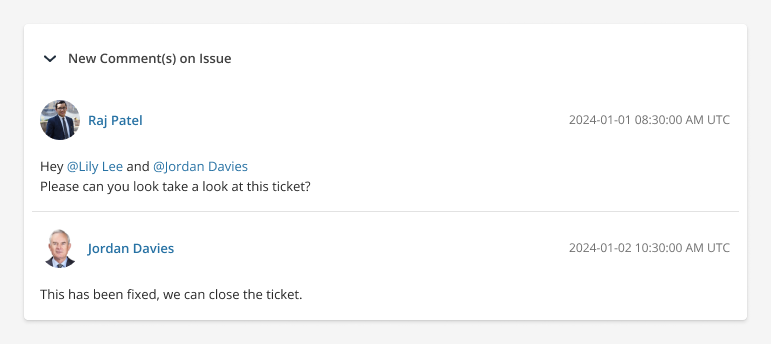
In this example, Raj added a comment on a previously archived Jira issue, then tagged Jordan and Lily. Jordan then replied with another comment.
The two Events have been added to different Section objects, so they will be displayed with a horizontal line between them in the Archive.
{
  "overview": {
    "threadId": "jira-issue:AB-1234"
  },
  "cards": [
    {
      "title": "New comment(s) on issue",
      "sections": [
        {
          "events": [
            {
              "eventTime": "2024-01-01T08:30:00Z",
              "user": {
                "identifier": "raj.patel@greenvaultcapital.com",
                "displayName": "Raj Patel"
              },
              "eventType": "Response to Post",
              "body": {
                "text": "<p>Hey @lily and @jordan</p><p>Please can you look take a look at this ticket?</p>",
                "textType": "html",
                "participants": [
                  {
                    "identifier": "jordan.davies@greenvaultcapital.com",
                    "displayName": "Jordan Davies"
                  },
                  {
                    "identifier": "lily.lee@greenvaultcapital.com",
                    "displayName": "Lily Lee"
                  }
                ]
              }
            }
          ]
        },
        {
          "events": [
            {
              "eventTime": "2024-01-02T10:30:00Z",
              "user": {
                "identifier": "jordan.davies@greenvaultcapital.com",
                "displayName": "Jordan Davies"
              },
              "eventType": "Response to Post",
              "body": {
                "text": "<p>This has been fixed, we can close the ticket.</p>",
                "textType": "html"
              }
            }
          ]
        }
      ]
    }
  ]
}
Capturing user reactions
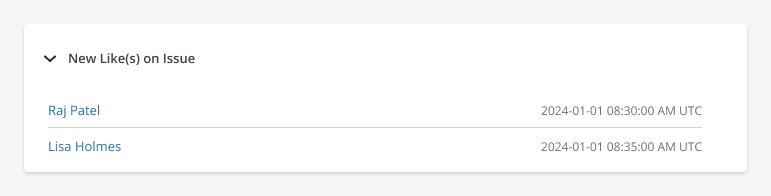
To capture reactions to posts, e.g. likes, upvotes, downvotes, etc., use the simpleEvents object with an eventType value of Reaction.
Use cards.title to indicate the type of reaction, so users can view what type of reaction was provided.
{
  "overview": {
    "threadId": "jira-issue:BC-1235"
  },
  "cards": [
    {
      "title": "New Like(s) on issue",
      "sections": [
        {
          "simpleEvents": [
            {
              "eventTime": "2024-01-01T08:30:00Z",
              "user": {
                "identifier": "raj.patel@greenvaultcapital.com",
                "displayName": "Raj Patel"
              },
              "eventType": "Reaction"
            },
            {
              "eventTime": "2024-01-01T08:35:00Z",
              "user": {
                "identifier": "lisa.holmes@greenvaultcapital.com",
                "displayName": "Lisa Holmes"
              },
              "eventType": "Reaction"
            }
          ]
        }
      ]
    }
  ]
}